
Palette
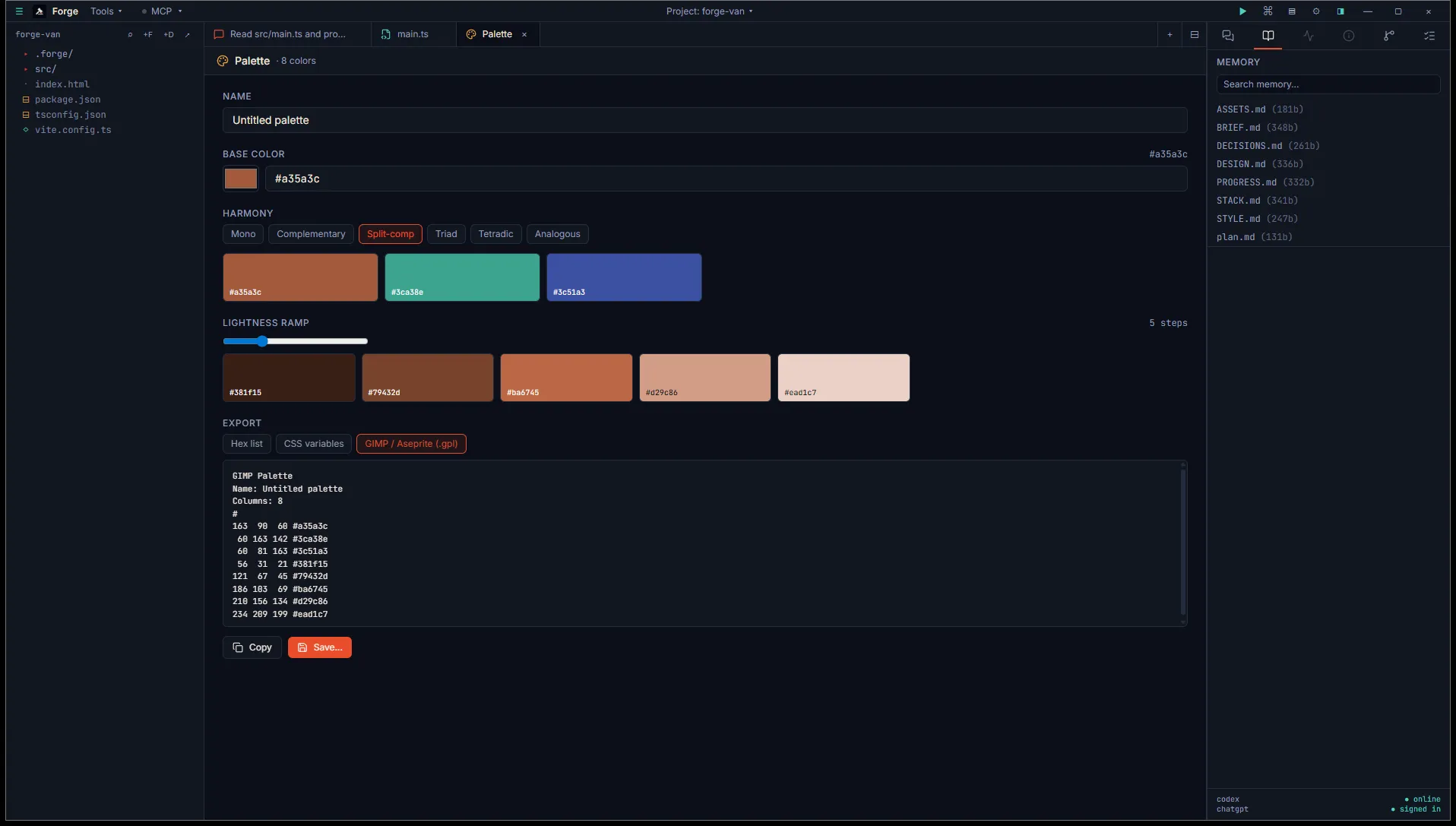
The Palette tab is a small color theory tool. Pick a base color, choose a harmony scheme, generate a lightness ramp, copy individual swatches or export the whole set.
Open it
Section titled “Open it”Title bar Tools menu, then Pipeline tools, then Palette.
Inputs
Section titled “Inputs”- Base color. Hex picker plus a text input. Validates
#RRGGBB. - Harmony. One of:
- Mono (single hue, varied lightness).
- Complementary (base plus its opposite).
- Split-comp (base plus the two adjacent to its complement).
- Triad (three colors evenly spaced on the wheel).
- Tetradic (two complementary pairs).
- Analogous (three adjacent hues).
- Ramp steps. Number of lightness steps from black to white through the base. Slider, 3 to 11.
The harmony swatches and the lightness ramp render below as separate grids.
Click a swatch
Section titled “Click a swatch”Clicking any swatch copies its hex value to the clipboard. A “copied” toast confirms. If your browser doesn’t grant clipboard access, the copy silently fails; you can still select the hex from the export pane below.
Export
Section titled “Export”Three formats:
- Hex list. One color per line, no prefix. Useful for piping into scripts.
- CSS variables.
--color-1: #...;declarations. - GIMP / Aseprite (.gpl). GIMP Palette Format, also accepted by Aseprite.
The preview pane shows the export text. Hit Copy to grab it, or Save… to write a file.
Output
Section titled “Output”Files save to <project>/.forge/generated/palettes/<timestamp>.<ext>. The extension matches the format you exported.
- The base color defaults to Forge’s brand persimmon
#a35a3c. Change it once and your future generations start from there. - Duplicate colors in the export are removed by hex value (case-insensitive). If your harmony naturally produces a near-duplicate, you’ll see one entry, not two.
- This tool runs entirely in your browser. No external API. No key required.