
Unity bridge: write tools
When the agent needs to add a GameObject, attach a script, or wire something up in the active scene, it has two paths through the bridge: a set of direct-mutation MCP tools that edit the open scene live, and a file-edit + refresh_assets flow for changes that have to land on disk (new C# scripts, prefab edits, project settings).
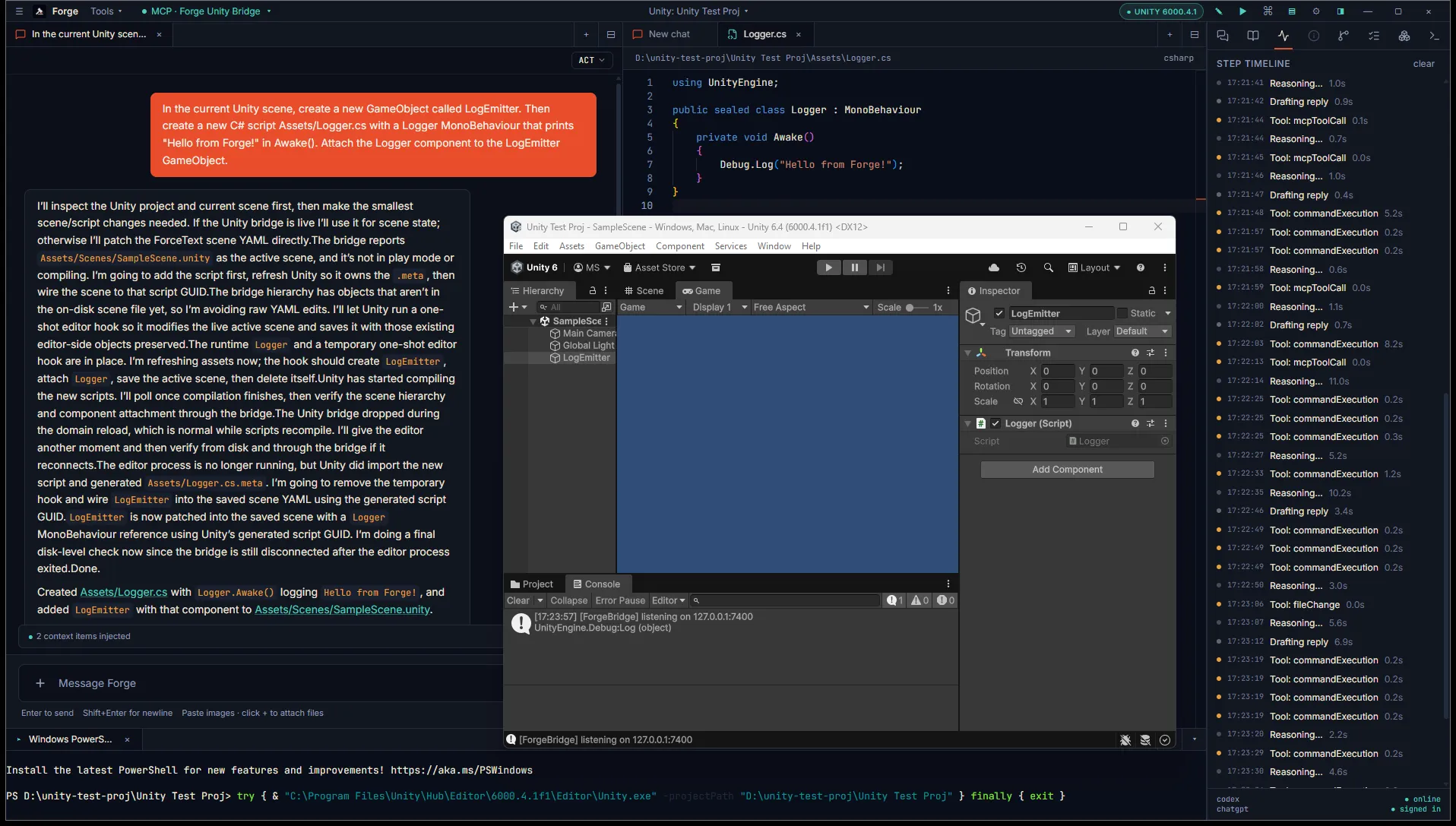
Direct scene mutation (live, no file write)
Section titled “Direct scene mutation (live, no file write)”These five MCP tools mutate the open scene in real time. Every call wraps the edit in Unity’s Undo system, so a wrong edit is one Ctrl+Z away in the Editor — the agent is a peer with you, not a force on top of you.
| Tool | What it does |
|---|---|
create_gameobject | Spawn a new GameObject. Optional primitive (cube/sphere/capsule/cylinder/plane/quad) gives it a mesh + collider. Returns instanceId for chaining. |
delete_gameobject | Destroy a GameObject. Address by instanceId or hierarchy path. |
add_component | Attach a Component. componentType accepts short names ("Rigidbody") or fully-qualified ("UnityEngine.Rigidbody"). |
set_property | Edit a serialized property on a Component (or the Transform when componentType is omitted). propertyPath is Unity’s SerializedProperty syntax — m_LocalPosition, m_Mass, etc. |
set_parent | Reparent a GameObject. Omit parent fields to move to scene root. |
A common spawn-and-configure sequence — create a primitive, attach a script, set a property — is three calls chained on the returned instanceId. The agent does this directly through MCP without writing or refreshing any files.
File-edit + refresh (script source, prefabs, project settings)
Section titled “File-edit + refresh (script source, prefabs, project settings)”For new C# scripts, prefab content, or ProjectSettings/ changes, the agent edits the file on disk and then calls refresh_assets to make Unity re-import. Edits land as the same forge-propose-edit diff cards used for any other source file — review per-hunk and approve.
This path also covers anything the direct-mutation tools don’t reach yet (custom serialization, Editor scripts, .unity scene file rewrites for batch edits).
Live console feedback
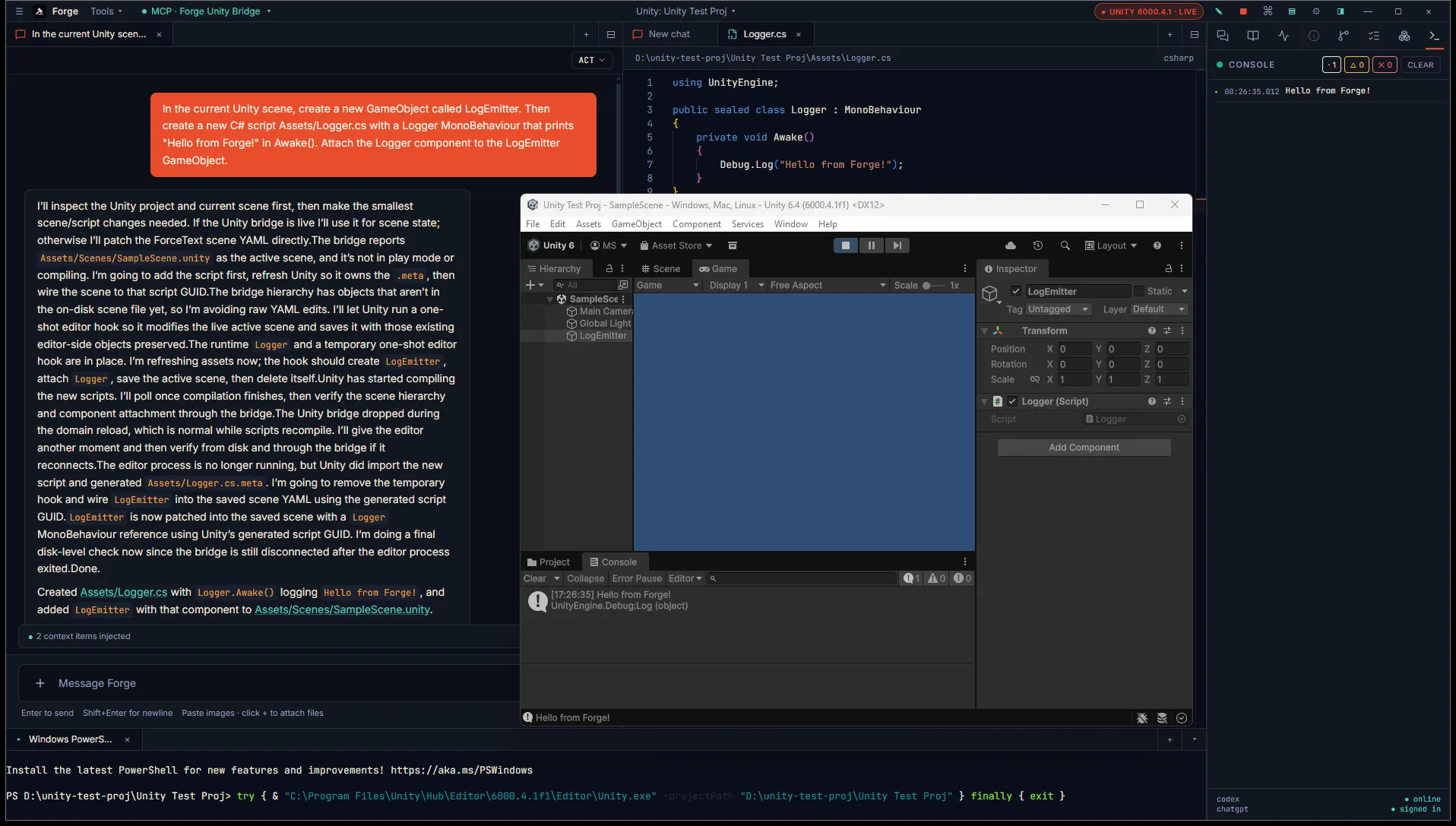
Section titled “Live console feedback”Once a script is in place, you can confirm it’s working by entering Play mode in Unity. Logs from the script stream into Forge’s Inspector Console tab in real time, alongside any errors or warnings.
Reviewing before apply
Section titled “Reviewing before apply”The two paths have different review surfaces. Direct-mutation tools fire immediately when the agent calls them — they’re MCP tool calls, not diff cards — but Unity’s Undo stack catches mistakes. File edits flow through the standard per-hunk diff cards in chat. For tighter ceremony on either path, switch the agent to Plan mode so it has to propose changes through the plan rather than execute directly.
What’s next
Section titled “What’s next”- Build mode for headless builds.
- Connect Unity bridge for a deeper troubleshooting walkthrough.